Everything Roamer does for your Rivian
Roamer is an independent companion app for R1 and R2 owners on the web, iPhone and connected AI assistants. Browse public trackers without an account, link your Rivian for live status and alerts, or add Roamer Plus for every drive, charge, trip and trend.
No account
Public trackers for software updates, R2 orders, charging stations, tires, inventory and leaderboards.
Free
Link your Rivian account for live vehicle status, software and order alerts, build rarity and a full copy of your data.
 Roamer Plus
Every drive, charge, trip, battery trend, efficiency breakdown, automatic tire set, report and connected AI assistant.
$4.99 a month or $54.99 a year.
Drive sessions and trips
Look back on every drive, daily timeline and road trip, with interactive maps, synced charts, saved places and automatic tags.
-
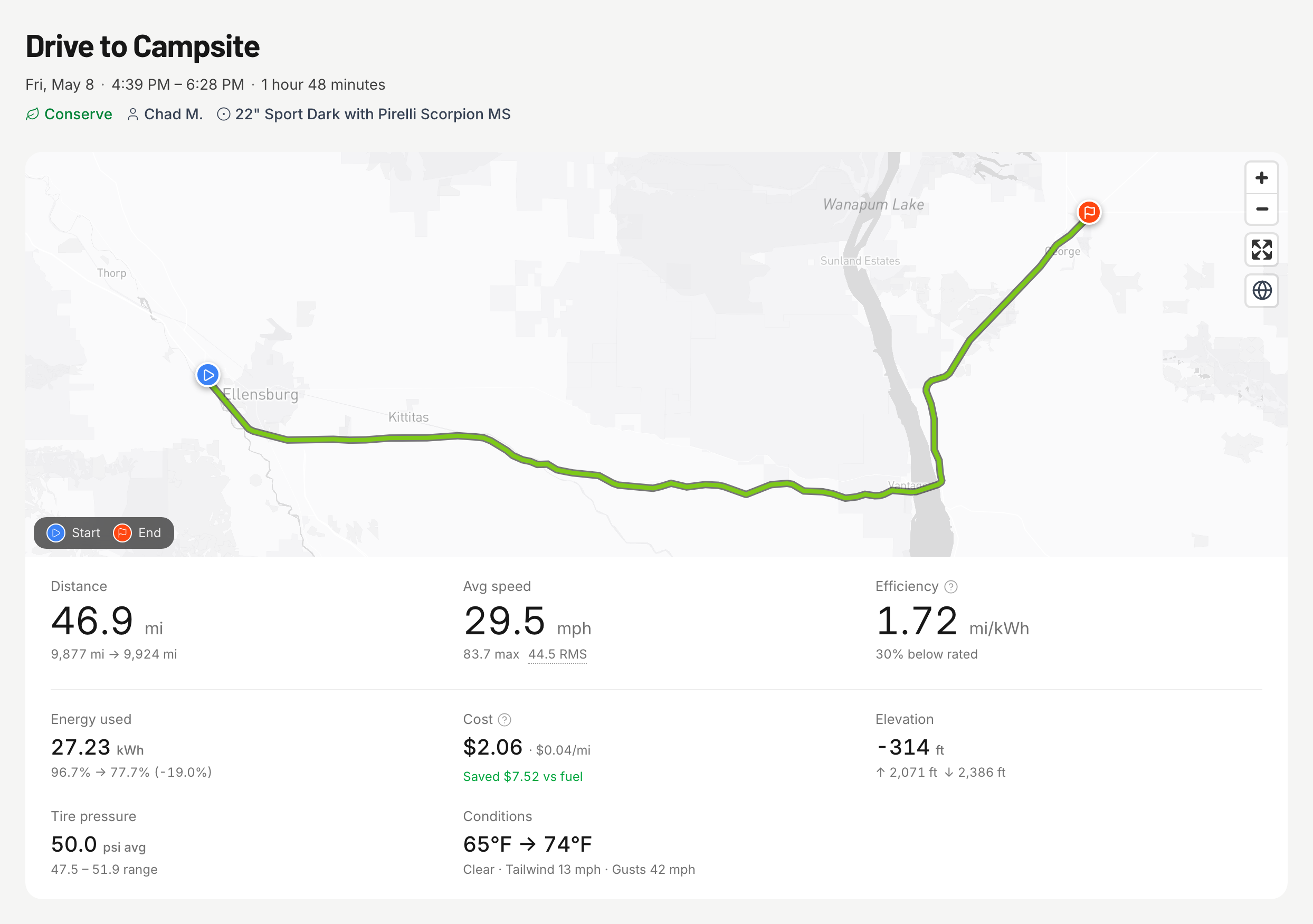
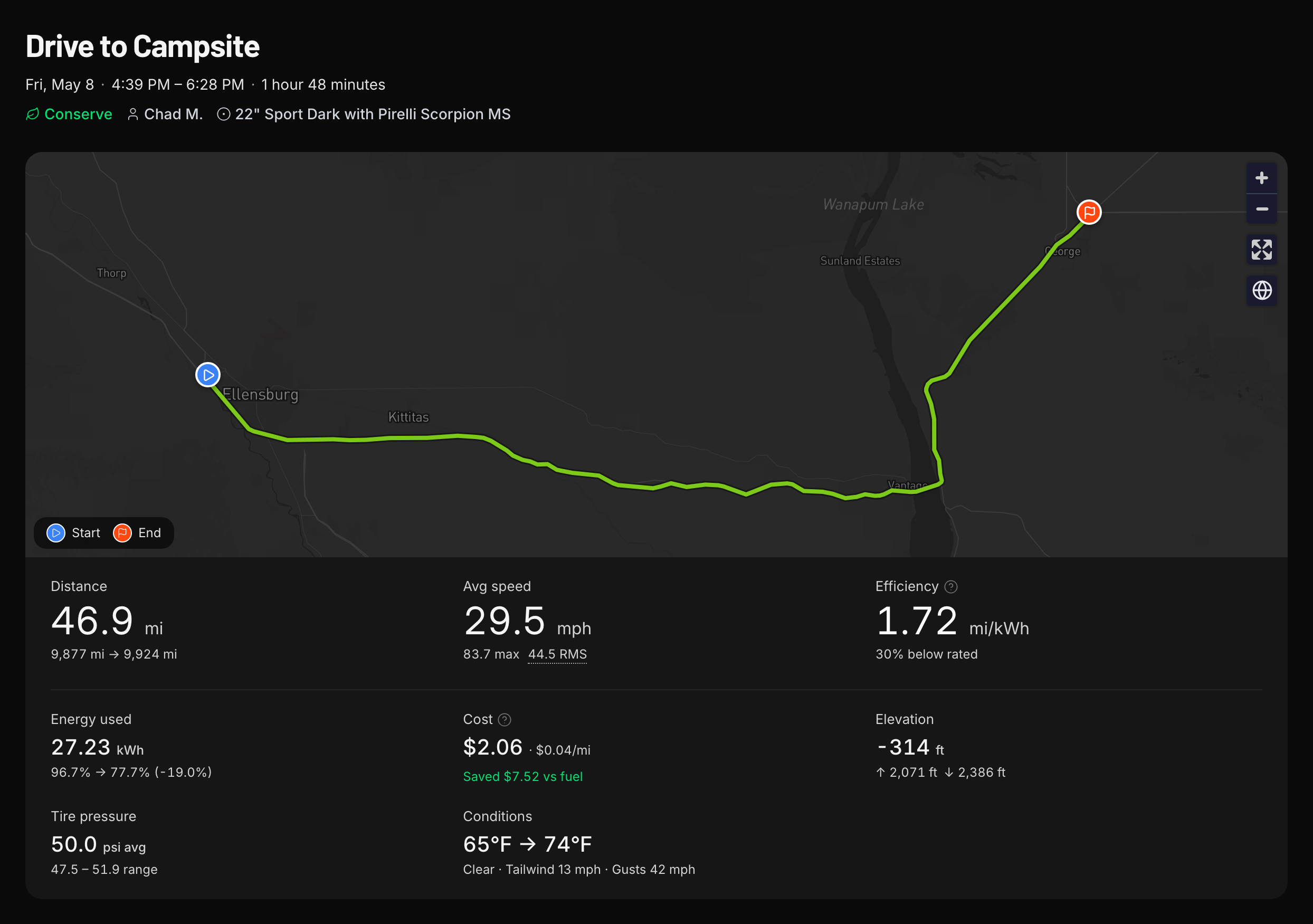
Drive history
PlusWeb · iPhone · AI assistantsLook back on any drive to see where you went, what it cost and what shaped your efficiency.
- Speed, elevation and energy
- Distance, odometer, moving, max and energy-weighted RMS speed, elevation gain and loss, and downhill net energy gain.
- Efficiency, cost and gas savings
- Graded against your historical rated baseline, with estimated energy cost and savings compared with gas.
- Estimated weight and towing
- Estimated vehicle and added cargo or trailer weight on the web, plus trailer and rear hitch accessory detection.
- Driver, mode and conditions
- Active driver profile, drive mode, wheel and tire set, plus cold accel, regen, defrost and heated steering wheel indicators on the web.
- Weather and wind
- Outside temperature, weather changes, computed headwind or tailwind along your heading and max gusts.
- Synced route map and charts
- Seven synced web charts (speed, elevation, efficiency, battery, tire pressure average and corner spread, pack and cabin temperature) scrubbing a paint-colored arrow on the map, with dashed GPS gaps and bad-data flags.
- Automatic stop naming
- Names endpoints from your saved places, adjacent charging stations or town without manual setup.
- Notes, edits and recording rules
- Edit places, drive mode, trailer or tags, add drive notes, customize stop-split timing and minimum distance, or permanently remove bad recordings on the web.
-
Activity search, filters and all-routes map
PlusWeb · iPhone · AI assistantsFind any drive or charge across months of history, or see every route you've driven on one map.
- Presets and range totals
- Ten date presets including Since charge and All history, custom dates, day-by-day month headers, driving, charging and phantom drain summaries and inline unrecorded odometer stretches.
- Deep filtering
- Filter by drive mode, driver, towing, tire set, distance, efficiency, start or end place, DC fast or Level 2, charging site, peak power, unconfirmed costs, town and tag.
- Flexible sorting
- Sort by date, distance, efficiency, elevation gain, altitude, peak power or cost (cost sorts on the web).
- All-routes map
- Switch any filtered range, even your entire history, from a list to a clustered map of routes and charging stops with satellite view and session popups on web and iPhone.
-
Daily timeline
PlusWeb · iPhoneSee what your Rivian did on any day, parked hours included, so no missing percent goes unexplained.
- Ten vehicle states
- Continuous battery curve colored across Driving, Charging, Camping, Pet Mode, Preconditioning, Gear Guard, Service Mode, Software Update, Idle and Asleep with duration totals.
- Scrubbing and long-range bars
- Scrub any day for exact timestamps and battery level; ranges past ten days switch to daily, weekly or monthly driving bars.
-
Road trips
PlusWeb · iPhone · AI assistantsKeep every road trip together from the first mile to the last charge, live as you drive or pulled from past dates.
- Live and scheduled trips
- Keep a live trip open to collect new drives and charges as they happen with a Day X of Y bar, schedule upcoming trips, or pull past dates into a trip log.
- Multi-route map
- Start, end, stop dwell times, charge pins and dashed unrecorded hops across every leg.
- Driving and energy totals
- Distance (including unrecorded miles), top driver, driving time, rated efficiency, full battery packs used, percent replaced by charging, climb and altitude range.
- Spend and daily itinerary
- Multi-currency charging spend, gas savings, peak charge power and a day-by-day summary.
-
Automatic tags
PlusWeb · iPhone · AI assistantsKeep business miles separate without logging each drive by hand. Attach Business or any custom tag to a saved place so every drive and charge there gets it (including past ones in one step), while tags you add manually stay put for CSV exports and AI totals.
-
Saved places
PlusWeb · iPhone · AI assistantsKnow which drives and charges happened at home, at work or anywhere else you visit.
- Overview map and search
- See all your saved places on one map with instant search, clickable drive and charge counts and one-tap backfill for past sessions.
- Rivian favorites sync
- Bring in Home, Work and saved favorites from your Rivian account so places move when you update them in Rivian.
- Custom geofencing
- Drop a pin by address, map click or your Rivian's current location with an adjustable geofence radius.
- Fit radius to stops
- Plots nearby past charges, departures and arrivals and sizes the geofence to cover them in one click.
Charge sessions and stations
See where every kilowatt-hour went, why a charge slowed down, what it cost and which public stations owners can count on.
-
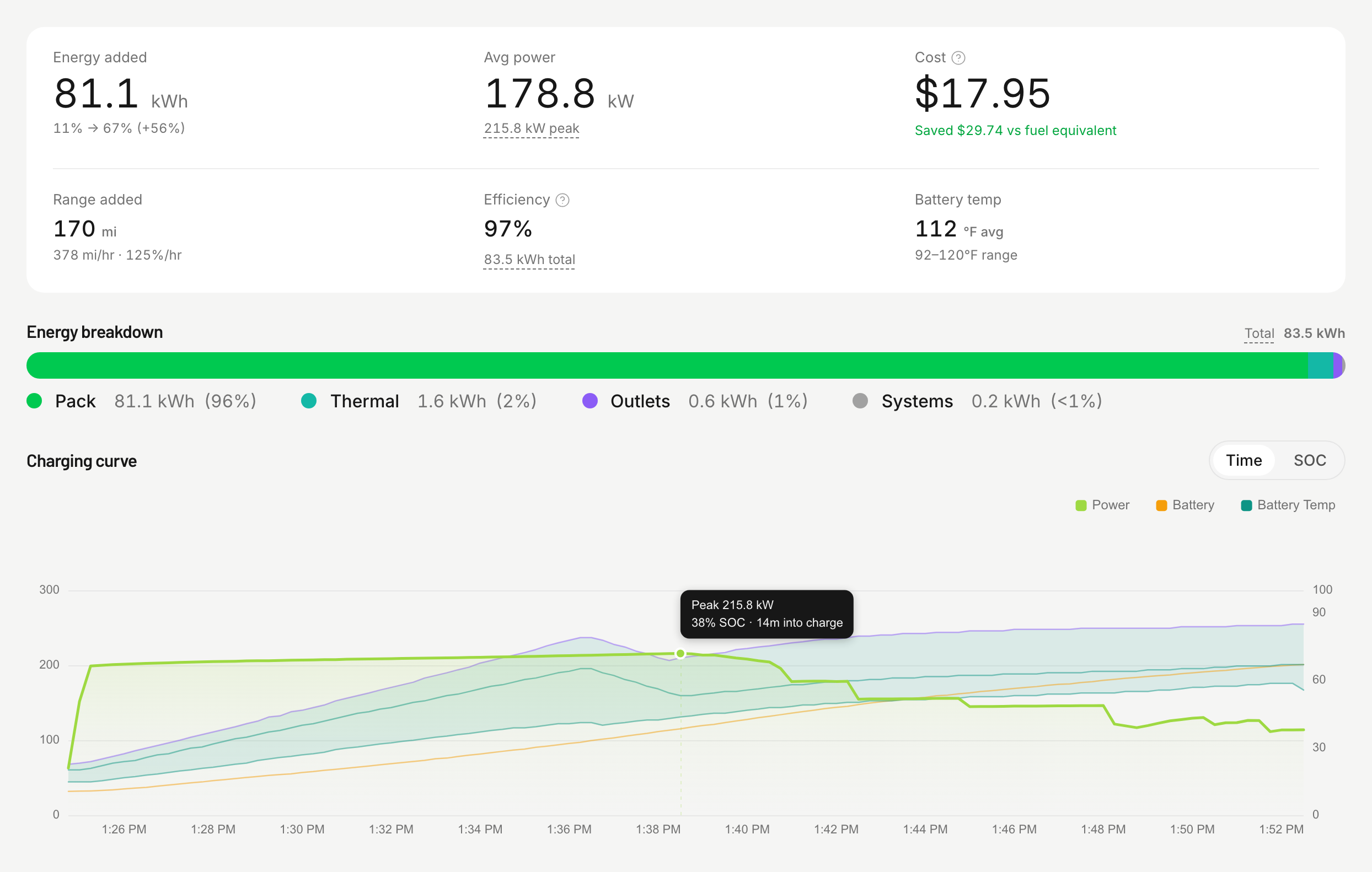
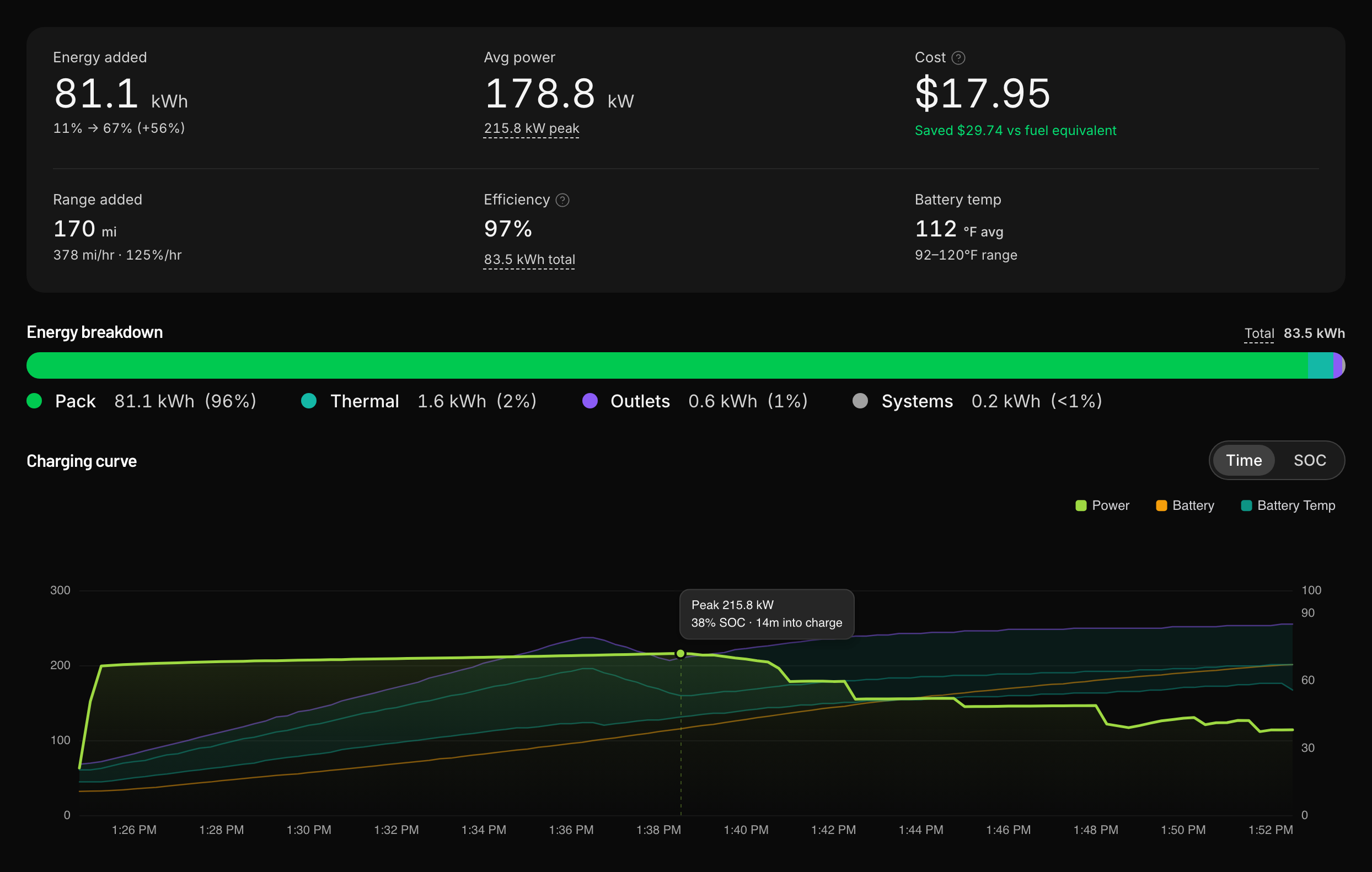
Charging curves, energy breakdown and slowdowns
PlusWeb · iPhone · AI assistantsSee where every kilowatt-hour went and why Rivian slowed a charge down.
- Energy breakdown
- Splits total port energy across Battery pack, Thermal, Outlets, Systems and Other alongside port-to-pack charging efficiency.
- Time and battery curves
- Switch between Time (power, battery and pack temperature spread) and battery percent, with peak power, kW and C-rate tooltips.
- Decoded slowdown reasons
- Shades Rivian's slowdown reasons right onto the curve with exact times and durations, from station limits to cold or hot packs.
- Overnight periods and site link
- Splits scheduled plug-ins into individual periods by date and links the charging station card, with one-click switching to nearby chargers.
-
Rivian charging receipts
PlusWeb · iPhone · AI assistantsSee what a public charge actually cost, fees included, when Rivian has a receipt for it.
- Public network receipts
- Matches Rivian receipts from RAN, Tesla Superchargers, Electrify America, IONNA, ChargePoint and other networks onto your recorded charges.
- Dispensed vs. delivered energy
- Shows paid total, effective rate, address, order ID and billed versus port-delivered energy to reveal cable loss.
- Free RAN tracking
- Tracks referral Free RAN expiration dates and marks free charges without mistaking unbilled stops for $0.
- Multi-currency and missing costs
- Keeps USD and CAD totals separate side by side and flags fast charges with no cost so you can enter what you paid.
-
Electricity rates and gas savings
PlusWeb · iPhone · AI assistantsMake your charging totals match what you actually pay and see how much driving electric saves you.
- Default, Home and place rates
- Set a default rate, a Home rate (which also sets your drive costs) and custom flat rates per saved place, including $0 free chargers.
- Retroactive updates and overrides
- Update past charging costs after a rate change while keeping manual totals, receipts and imports untouched, or enter exact rates and totals on any charge.
- Gas savings
- Compares electricity spend against gas across drives, charges, trips and monthly recaps using the weekly US average gas price or your own local price and fuel economy.
- Multi-currency accounting
- Tracks USD and CAD spending side by side without mixing currencies.
-
Charging mix and fast-charge comparison
PlusWeb · iPhone · AI assistantsKnow how much you rely on fast charging and how your speeds compare with similar Rivians.
- Charging mix and battery cycles
- Energy and spend across Home, Other Level 2 and DC fast charging, stacked history bars and equivalent full battery cycles.
- Fast-charge curve vs. fleet
- Compares your median DC fast curve and estimated 20% to 80% time against similar Rivians' middle-half band; iPhone also ranks top places and networks.
-
Charging stations and RAN tracker
No accountWeb · iPhoneKnow what a charging stop will be like before you pull in.
- RAN network tracker
- Interactive web map tracking Open Access percentage, NACS connectors and reliability across every Rivian Adventure Network site.
- Live stalls and trailer spaces
- Working stall counts, color-coded status blocks, connectors, max power, multi-plug stalls and trailer-friendly spaces.
- Pricing and amenities
- Rivian and non-Rivian rates (including time-of-day pricing and idle fees), Plug and Charge support, amenities and Apple Maps directions.
- Real Rivian charging curves
- Actual charging curves from the last 12 months of Rivian sessions at that site, with 20% to 80% times.
-
Charging network reliability
No accountWebPick charging stops by how reliably they work for Rivian owners. Compare A to F reliability grades, grade distributions, site and plug counts, average power and monthly network expansion across major networks, with site grades built into RAN pages and AI trip planning.
AI assistants
Connect Claude, ChatGPT, Gemini, Grok, Muse or another assistant over MCP to query your history, chart raw readings, plan trips and make edits.
Chart my 50-minute fast charge from July against similar R1s. Why was it so slow?
-
Connect your AI assistant
PlusAI assistantsAsk about your Rivian in plain language and get answers backed by your real history.
- Works where you chat
- Connects Claude (including Claude Free), ChatGPT, Gemini, Grok, Muse, Cursor, Claude Code, Codex and other assistants over MCP.
- Per-assistant privacy switches
- Separate toggles on web and iPhone for Vehicle data, Location data, Rivian trip planning and Roamer edits; never exposes Rivian passwords, tokens or billing, and can't control your vehicle or delete records.
-
Query your Rivian, history and reports
PlusAI assistantsGet answers from your live vehicle status, drives, charges, battery, software and pending orders without clicking through filters.
- Live status and active navigation
- Check locks, doors, windows, battery, charging slowdowns, tire pressures, camping, parked location, or your active route's ETA and charging stops ahead.
- Search drives and charges
- Find sessions by distance, efficiency, power, unconfirmed cost, driver, drive mode, towing, tire set, place, town, tag or weekday, with combined totals and a CSV download link.
- Reports and comparisons
- Pull driving, charging, gas savings and phantom drain totals for any range, compared against the prior period or the same stretch last year.
- Battery, efficiency, software and orders
- Ask about usable capacity trends, fleet rankings, model-matched release notes, rollout status, saved trips and pending Rivian orders.
-
Raw readings and year-long diagnostics
PlusAI assistantsInvestigate why something happened, like an overnight range drop or a slow fast charge.
- Raw charts and rollups
- Chart raw readings across climate, battery, charging, tires, driving, locks and closures, or roll them up by hour, day or week.
- State-change history
- Find every stretch of preconditioning, defrost, charging slowdown or open closure across up to a year, paired with start, min, max and end readings.
-
Trip planning sent to your Rivian
PlusAI assistantsPlan a road trip around how your Rivian actually drives, then send it straight to your vehicle's navigation.
- Checked against your real driving
- Pulls a route and charging stops from Rivian's trip planner and checks predicted energy use against your Rivian's own past drives on those roads.
- Stop reliability and navigation handoff
- Pairs each stop's reliability grade with your past charges there, then sends the route to navigation (which can wake your vehicle, asking to add a stop or replace if already navigating).
-
Scheduled reminders and bulk edits
PlusAI assistantsAutomate recurring checks in assistants that run scheduled tasks, and tidy up your history by asking.
- Scheduled reminders and recaps
- Set nightly checks if your Rivian is unlocked, unplugged or has a window open, or get weekly summaries and monthly business-mile tallies.
- Bulk tagging and charge costs
- Add or remove a tag across matching drives and charges in a single request, enter what you paid for a charge or mark it free.
- Trips and saved places
- Create or update trips (including Keep trip open), or save places with tags and rates and backfill past sessions.
- Notes, tires and mileage goals
- Write drive notes, rename tire sets and set monthly, yearly or lease mileage goals, returning previous values for easy undo.
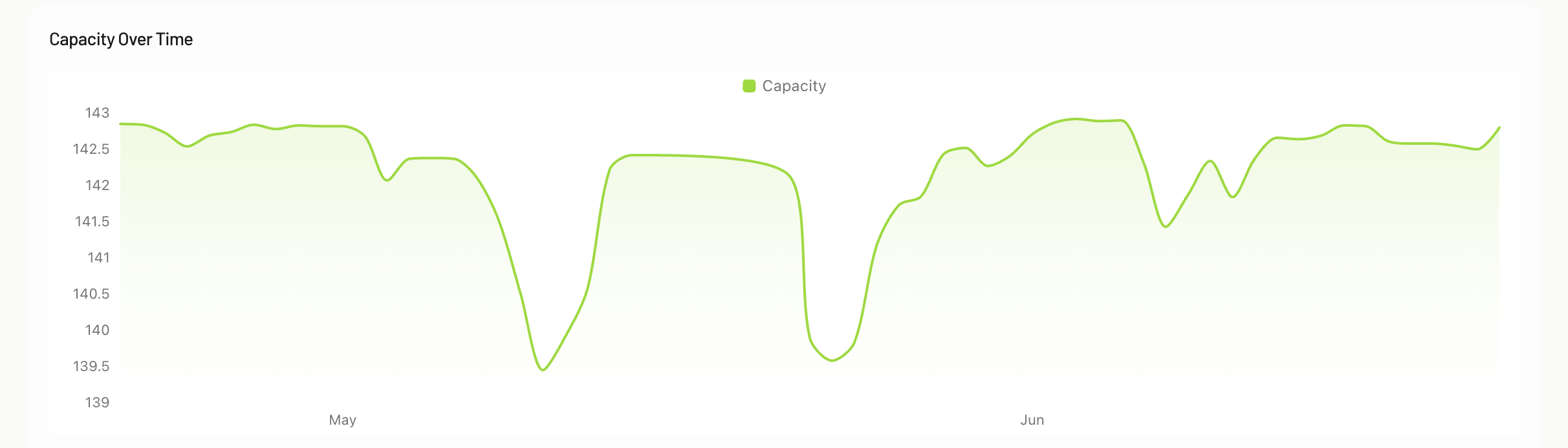
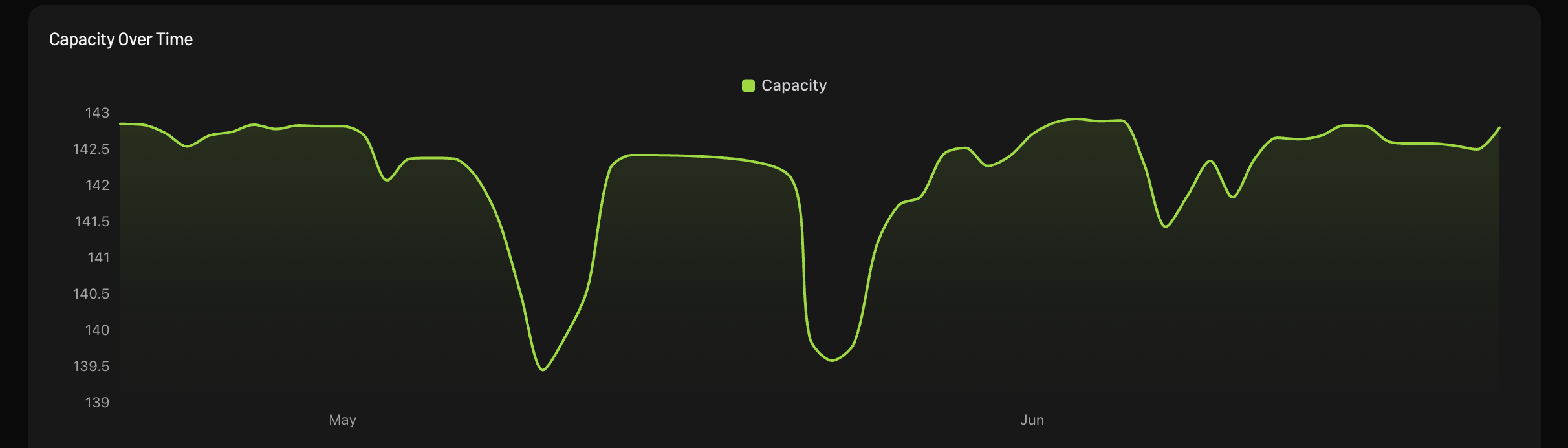
Battery tracking
Follow your pack's usable capacity across miles, years and seasons, separate cold mornings from capacity loss and see where parked charge goes.
-
Battery capacity over time
PlusWeb · iPhone · AI assistantsSee how your battery pack is holding up across years and miles, and separate cold mornings from real capacity loss.
- Time and odometer trends
- Usable capacity charted over time and miles with low-to-high range bands, a linear trendline, lifetime low-to-peak rail and automatic pack detection.
- Buffer line
- Marks how many kWh your pack can lose before full-charge range drops, or estimated range lost below it.
- Compare to similar packs
- Places your pack against an 8-in-10 band of matching models, generations and packs by mileage or build age.
- Pack and outside temperature
- On the web, plots daily capacity against pack temperature beside your pack's usual median curve and overlays 5 AM outside air temperature where you parked.
-
Charge level history
PlusWeb · iPhoneCheck that day-to-day charging stays in the battery window you aim for. Floating daily, weekly, monthly, quarterly or yearly bars show the lowest and highest battery level reached against a shaded 20% to 80% target zone.
-
Phantom drain
PlusWeb · iPhone · AI assistantsSee how much charge disappears while parked and what is causing it.
- Split by resting state
- Separates phantom drain (vampire drain) across Asleep, Awake and Gear Guard, excluding driving, charging, climate and Camping Stay On.
- Loss, cost and drill-down
- Total percent and kWh lost, average change per 24 hours, Home-rate cost and clickable daily bars that open that day's drives and charges.
-
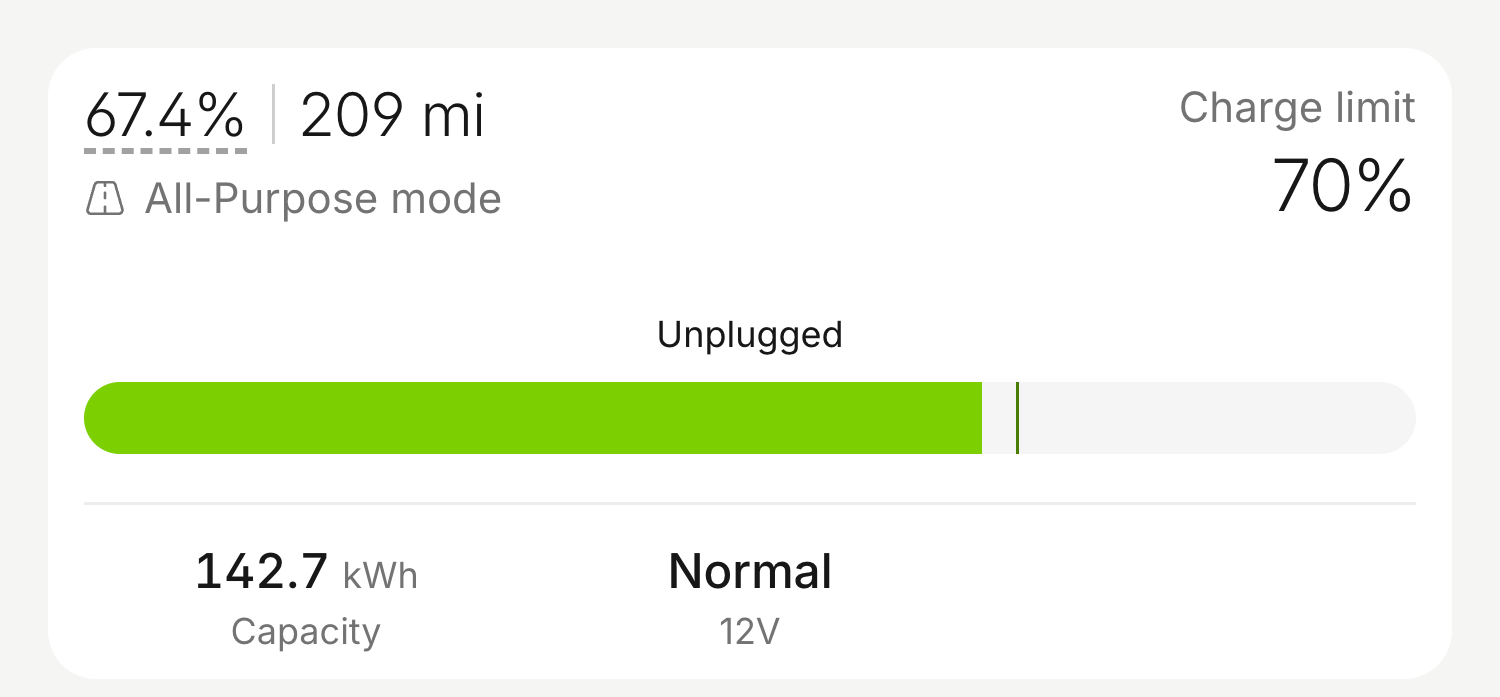
Live battery vitals and cold-weather reserve
FreeWeb · iPhoneKeep an eye on your main pack, 12V battery and cold-weather range impact for free.
- Usable capacity, 12V and pack temperature
- Current usable capacity in kWh, 12V status and a live Cold-to-Hot pack temperature gauge with coolest-to-warmest spread on models that report it.
- Cold-weather reserve
- Hatched reserve stripe on your battery bar whenever cold locks away charge, showing the exact percent held back and estimated range lost.
Automatic wheel and tire tracking
Track every set of wheels and tires without keeping a log, stay ahead of rotations and compare real-world tire efficiency across R1 and R2.
-
Automatic wheel and tire tracking
PlusWeb · iPhone · AI assistantsSee what each set of wheels and tires does to your efficiency without keeping a log.
- Zero-log swap detection
- Follows the wheels and tires set in your Rivian and matches every drive to the set you drove on.
- Storage-return matching
- Rejoins seasonal sets returning from storage using exact three-way odometer proof, with one-click undo.
- Per-set efficiency
- Distance-weighted efficiency graded against rated and average moving speed for every set.
- Custom catalog, merge and rebuild
- Custom set names, Tire Catalog picker, smart duplicate merge suggestions with preview, event timelines, archive and rebuild from history.
-
Tire mileage and rotation forecasts
PlusWeb · iPhone · AI assistantsRotate on time and know the exact miles on every set.
- Rivian-matched mileage
- Counts tire miles the same way your Rivian does, including manual mileage entries on your center display.
- Forecasts and alerts
- Rotation progress bar, estimated rotation date from your recent daily driving and priority alerts at 90% (soon) and 100% (due).
-
Live tire pressure
FreeWeb · iPhoneSpot a low tire before you pull out of the driveway. Live four-corner pressure in psi, bar or kPa alongside Normal, Warning, Critical and Puncture alerts straight from your Rivian.
-
Tire pressure history
PlusiPhone · AI assistantsCatch a tire slowly losing air before a warning light comes on. Daily average pressure charts for all four corners over 30 days or any date range make slow leaks, temperature swings and refills stand out.
-
Tire efficiency guide
No accountWebPick your next set of tires knowing how they perform for real Rivian owners.
- R1 and R2 rankings
- Distance-weighted real-world efficiency rankings (including towing where available), filterable by platform, tire type, factory fitment and wheel size.
- Confidence-tested comparisons
- Individual tire pages with 95%-confidence comparisons against factory or competing tires and 10th-to-90th percentile owner distributions.
- Temperature and speed curves
- Outside temperature curves, moving speed curves and a 2D city, mixed and highway efficiency matrix.
- Personalized range calculator
- Estimates what switching tires could gain or cost using your own 12-month driving average and pack with Roamer Plus.
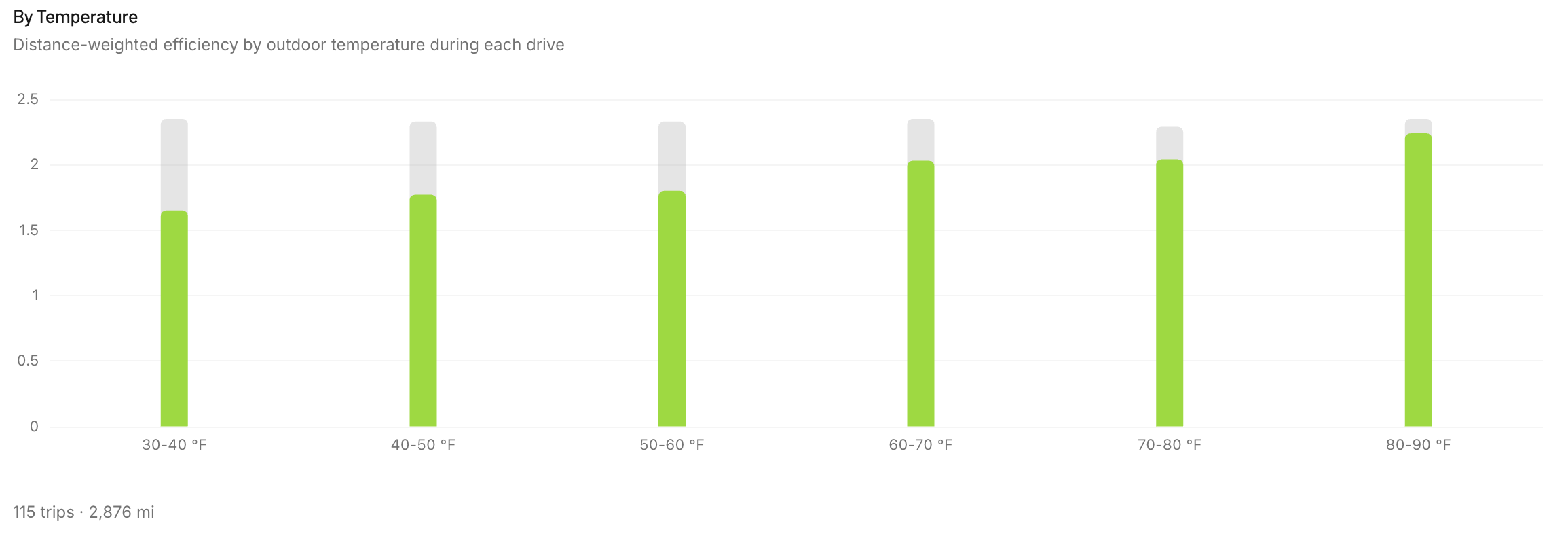
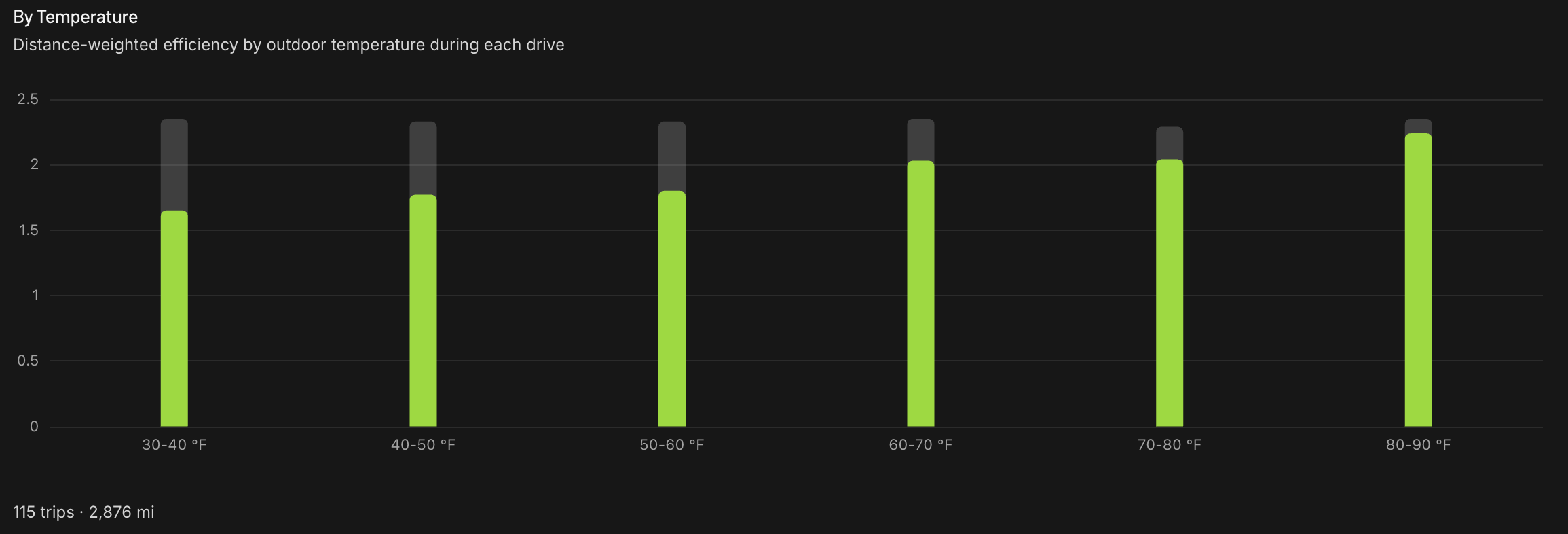
Efficiency and range
See how temperature, speed, tires, drivers and towing shape your efficiency, and know how far a charge will really take you.
-
Driving efficiency and fleet rank
PlusWeb · iPhone · AI assistantsSee how cold weather, highway speed, tires, drivers and towing change your range, and where you rank among similar Rivians.
- Trend against rated
- Efficiency over time charted against your historical rated baseline and fleet median, with prior-period comparisons.
- Temperature and speed bands
- Outside temperature bands (10°F or 5°C) and moving speed bands (10 mph or 20 km/h up to 70+ mph).
- Tires, drivers and towing
- Separate breakdowns by wheel and tire set, driver profile and towing versus non-towing, plus a one-tap towing toggle on iPhone.
- Fleet and same-tire rank
- Exact rank and percentile strip against Rivians with your model, generation, powertrain and pack, narrowing to same-tire peers once you have enough miles.
-
Real-world and drive-mode range
PlusWeb · iPhone · AI assistantsKnow how far your current charge will take you the way you actually drive, and in each drive mode.
- Effective real-world range
- Shows range at your actual efficiency over the last 30 days or any custom date range, right beside Rivian's rated estimate.
- Range in each drive mode
- On an R1 (web and iPhone), mirrors the in-vehicle Range Estimates screen with current-charge and 100% range for All-Purpose, Conserve, Sport and other modes on your current tires.
Mileage, reports and recaps
Track your lease pace, compare any two stretches of driving and charging and get monthly driving recaps by email.
-
Mileage history, goals and lease limits
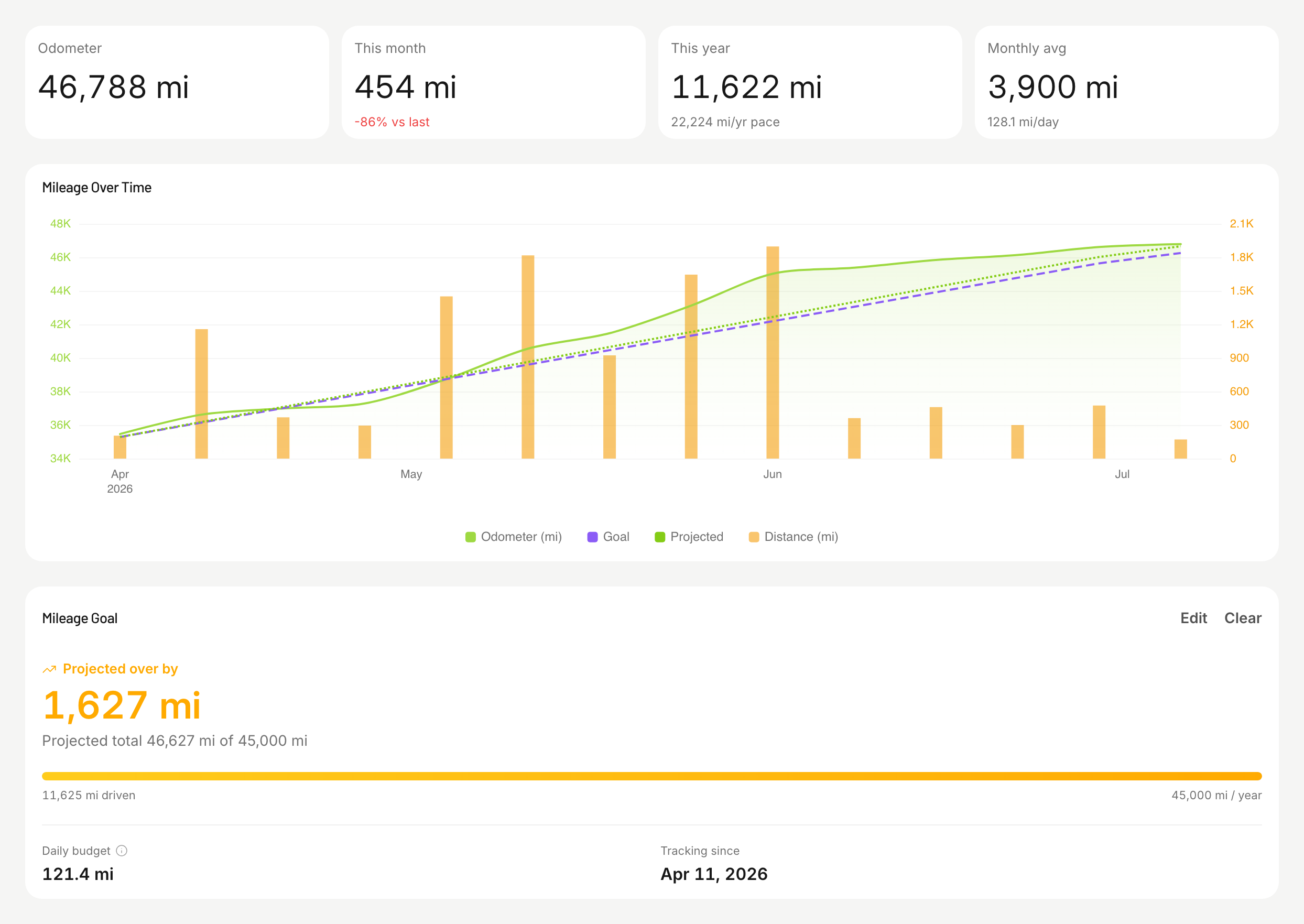
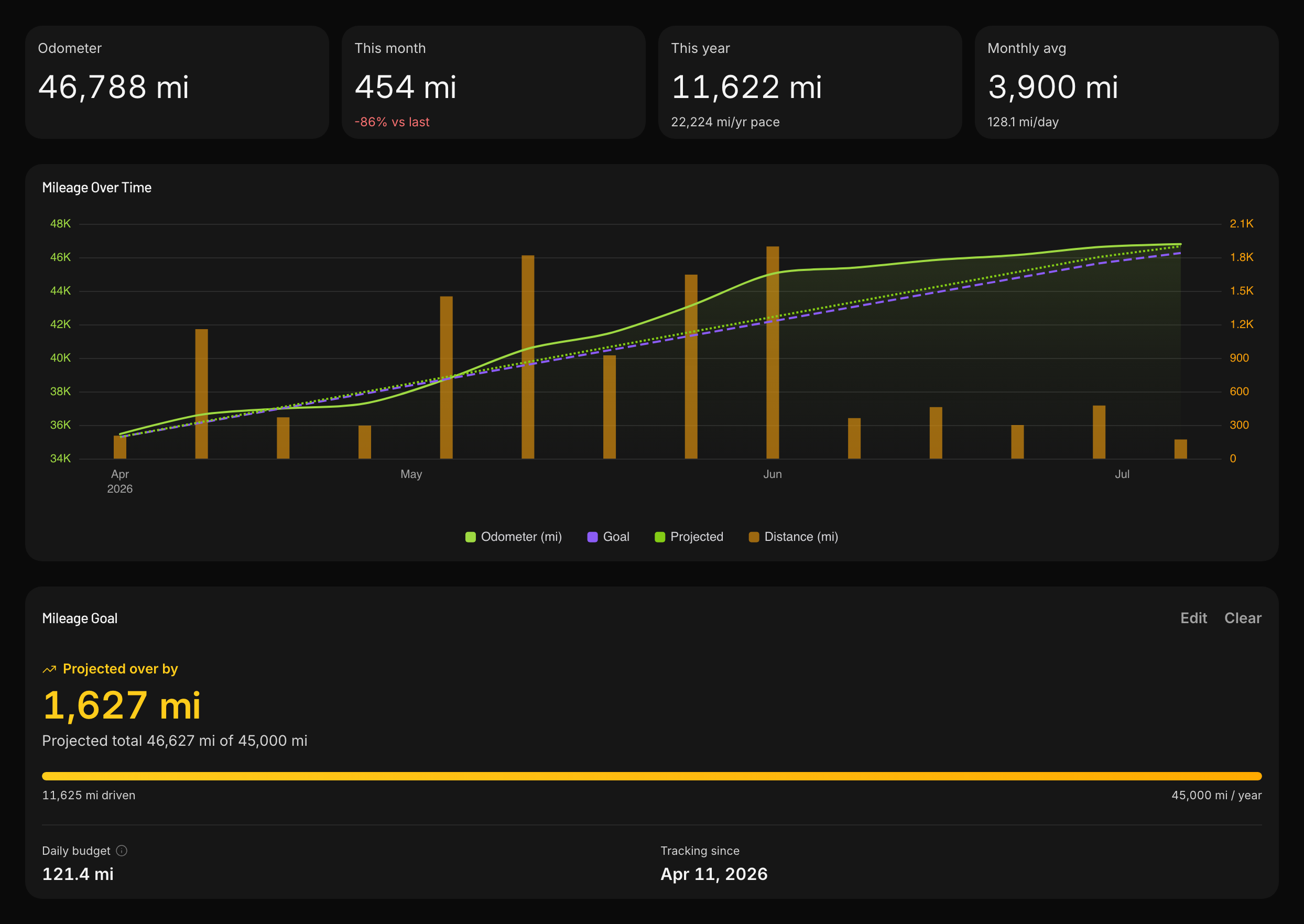
PlusWeb · iPhone · AI assistantsStay under a lease limit or personal target without a surprise at turn-in.
- Usual daily baseline
- Distance history chart compared against your usual daily driving, with road trips excluded from the baseline.
- Rate or lease goals
- Set a monthly or yearly mileage goal, or a full lease allowance with start odometer and end date.
- Cumulative pace chart
- Plots miles driven against your allowance line and projected finish.
- Remaining budget
- Exact miles under or over pace, remaining miles and remaining daily mileage budget.
-
Driving and charging reports
PlusWeb · iPhone · AI assistantsPick presets like Last 30 days, This year or Since charge, or choose custom start and end dates to compare driving efficiency, effective range, battery capacity and charging spend against the prior matching stretch, keeping USD and CAD totals separate.
-
Driving recaps
PlusEmail · Mobile notificationsKeep up with your Rivian without having to open Roamer.
- First Drive and First Week
- Milestone recaps by email and mobile notification with early efficiency, trips and standout sessions.
- Monthly Driving Recap
- Email with miles versus last month, fleet efficiency rank, multi-currency spend, trip log and standout highlights like Out of Spec, The big climb and On the house.
Software updates
Follow every Rivian release from early sightings through your vehicle's download and install, with alerts if a download pauses.
-
Software update alerts and live progress
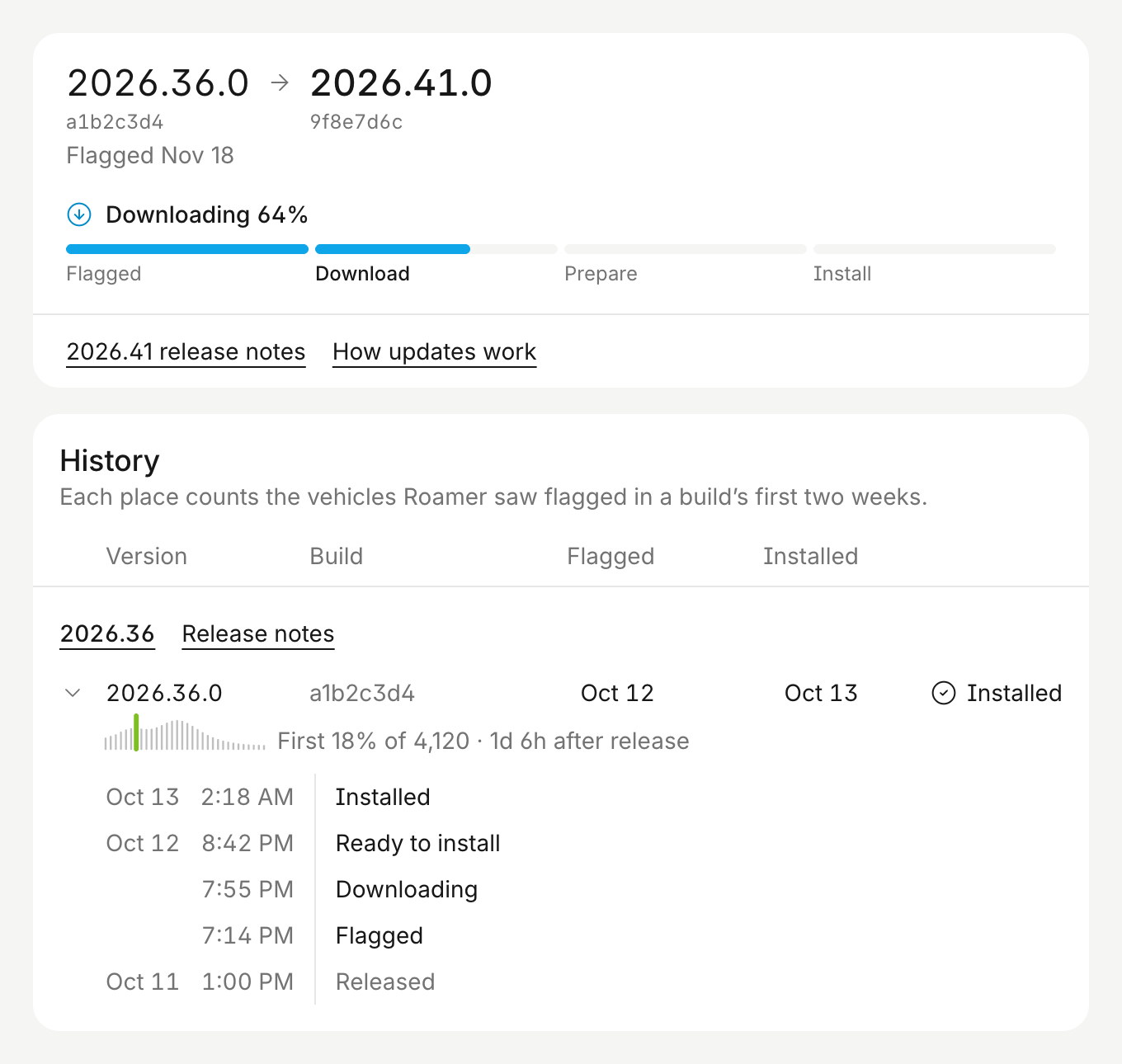
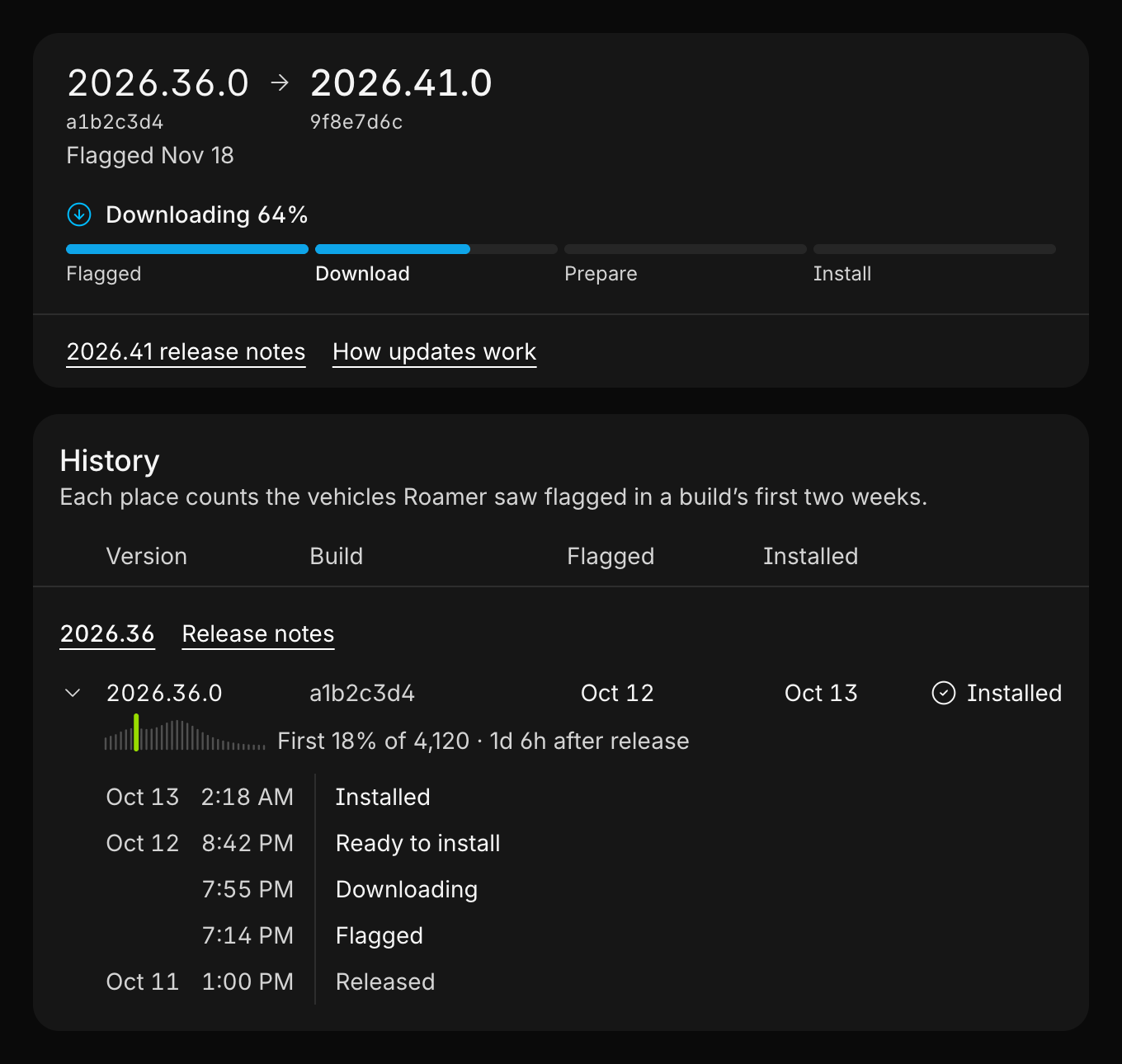
FreeWeb · iPhone · Email · Mobile notificationsFind out the moment Rivian offers your vehicle an update and watch it install step by step.
- Live four-stage tracker
- Flagged, Download, Prepare and Install progress bars with scheduled times, countdowns, pause reasons and Wi-Fi notices.
- Update and paused-download alerts
- Per-vehicle alerts for release notes and rollout starts by email, vehicle offers by email and mobile notification, and paused downloads by mobile notification.
- Fleet adoption context
- Train-specific fleet adoption percentage while you wait to be flagged.
- Early builds and respins
- Spots unreleased builds early and flags build respins under the same version number.
-
Personal software update history
FreeWeb · iPhoneKnow whether your Rivian gets updates early or late and how long each version ran.
- Build log and rollout standing
- Grouped by release family with build IDs, flagged and installed dates, days run and a tick strip of where you fell in the first two weeks.
- Event timelines and HD Maps
- Expandable per-update event logs with folded connection drops, Early Access detection and your installed HD Maps version.
-
Software update tracker
No accountWebSee what an update changes and how fast it's rolling out before it reaches your driveway.
- Live fleet adoption
- Separate rollout bars for R1 Gen 1, R1 Gen 2 and R2, plus an Up Next tracker for spotted builds and preliminary notes.
- Connect+ and rollout charts
- Connect+ versus non-Connect+ rollout comparison, 14-day pace and rollout-over-time charts.
- Model-matched release notes
- Filter release notes by model and generation, with a one-click filter for your own vehicles.
- Full archive and widget
- Version and respin history plus an embeddable rollout widget and visual rollout guide.
Your Rivian right now
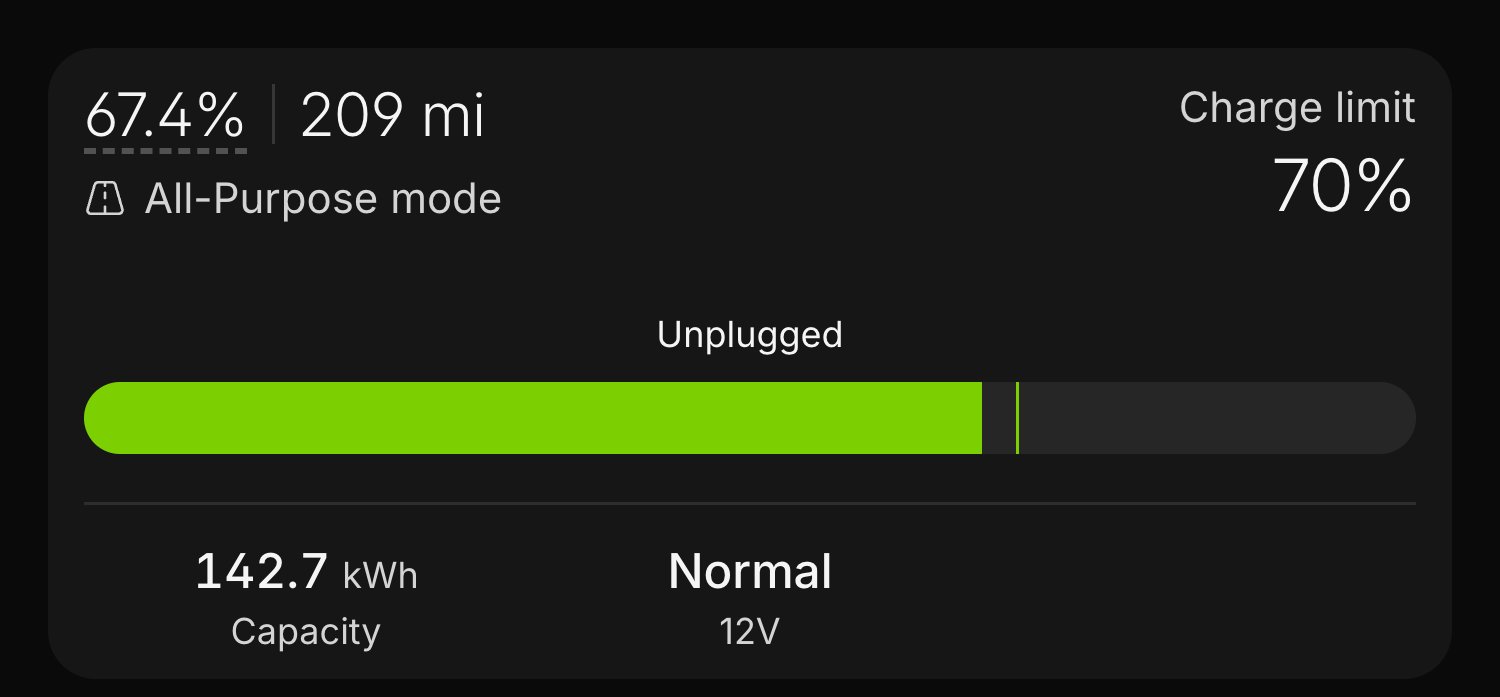
Check locks, closures, climate, camping, connectivity and warnings from anywhere, with live updates across every Rivian on your account.
-
Live vehicle status, climate and diagnostics
FreeWeb · iPhoneKnow at a glance whether your Rivian is locked, closed up, warm and online across every vehicle in your household.
- Live readout and vehicle switcher
- Battery bar, charge limit tick, range, charging power, speed, saved place and open-closure alerts across every Rivian on your account (including household vehicles shared as a driver).
- Model-aware closures and modes
- Doors, frunk, R1T gear tunnels and tonneau, R1S and R2 liftgate, R2 rear glass, all windows, locks, drive mode, active driver, trailer and hitch accessory, Car Wash Mode and Service Mode.
- Climate, Pet Mode, Camping and Gear Guard
- Cabin temperature, setpoint, preconditioning, defrost, Cabin Hold, visual front, rear and 3rd-row seat heat and ventilation grid, Pet Mode, R1 Camping (Stay On, Stay Off, Camp Courtesy) and Gear Guard status on the web.
- Connectivity, build card and history
- Live cellular carrier, bars and dBm, Wi-Fi band, speed and dBm, paint swatch and build dates, Free RAN expiry, masked click-to-reveal VIN, archived vehicle records and lifetime electric miles, hours and CO₂ saved.
-
Real-time streaming updates
PlusWeb · iPhoneWatch your battery fill and status change as it happens without hitting refresh. Live readings stream while Roamer stays open and pause when you switch away; without Roamer Plus, status refreshes every few minutes.
-
Vehicle warnings and proactive health alerts
FreeWeb · iPhone · Email · Mobile notificationsHear right away when your Rivian reports a warning or quietly stops sending data.
- Rivian warnings and hardware checks
- Sounding alarms, disabled charging, 12V battery, wiper fluid, LFP 100% calibration, thermal events and six battery and thermal module checks.
- Proactive hard-reset alerts
- Email and mobile notifications when an R2 stops reporting on cellular or a vehicle stops sending lock and closure updates, with steps to reset.
- Location and access health
- Fast alerts if location sharing turns off on your Rivian, plus 30-day advance reminders before Rivian access expires.
- Notification Center
- In-app inbox with email and mobile notification preferences for account and per-vehicle alerts.
-
Build and delivery anniversaries
FreeEmail · Mobile notificationsCelebrate your Rivian's build day and delivery day every year by email or mobile notification, with your lifetime electric miles, hours on the road and CO₂ saved.
Leaderboards and achievements
Opt in to compare your driving across 20 leaderboards, revisit clickable personal records and see how rare your Rivian build is.
-
Leaderboards and achievements
No accountWeb · iPhoneSee how your Rivian stacks up against other owners across 20 opt-in leaderboards.
- 20 boards across five categories
- Efficiency, Distance and Endurance, Charging, Vehicle History and Oddities like Out of Spec (miles driven after range hits zero), towing, elevation and Oldest Rivians.
- Fair divisions and archives
- Separate All, R1 and R2 divisions across current month, current year, all time and past archives back to September 2025.
- Free and Plus entry
- Three Vehicle History boards are free to join; 17 more boards (including daily mileage since delivery) are included with Roamer Plus, all rolled up in Achievements.
- Opt-in privacy
- Private by default until you turn on social sharing, with your row highlighted even outside the top 25.
-
Personal bests
PlusWeb · iPhoneNine lifetime records across all your Rivians that open the winning drive or charge in one click: Longest Drive, Most Efficient, Least Efficient, Longest Duration, Highest and Lowest Elevation, Deepest Discharge, Highest Charge Rate and Most Energy Delivered.
-
Build rarity
FreeWeb · iPhoneSee how many other Rivians on Roamer share your exact paint, interior and wheel combination within your model and generation, for both delivered vehicles and pending orders.
-
Free fleet comparisons on iPhone
FreeiPhoneWithout Roamer Plus, compare your mileage against Rivians built the same month and your usable battery capacity against similar packs right in the iPhone app.
Orders and Rivians for sale
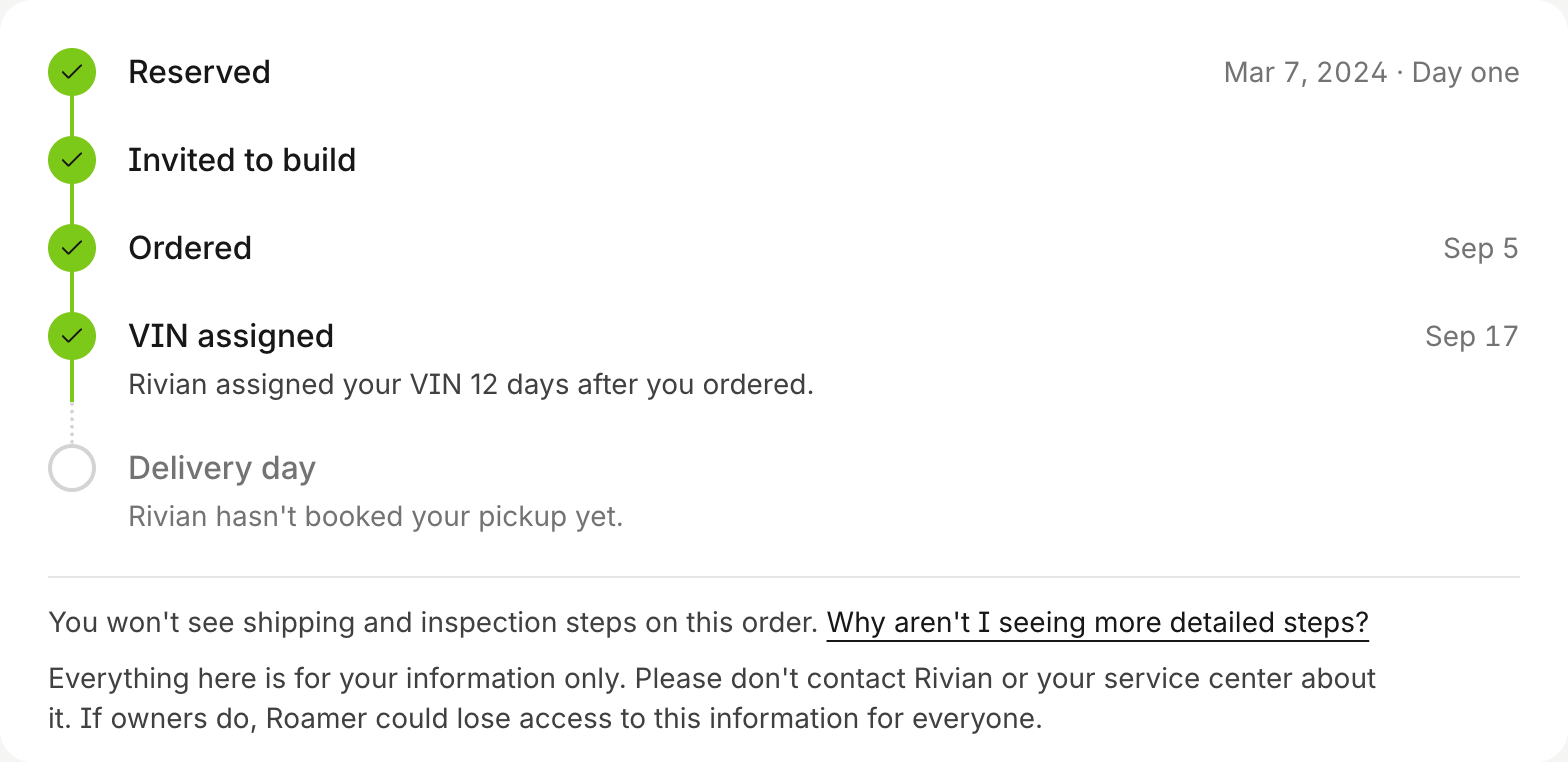
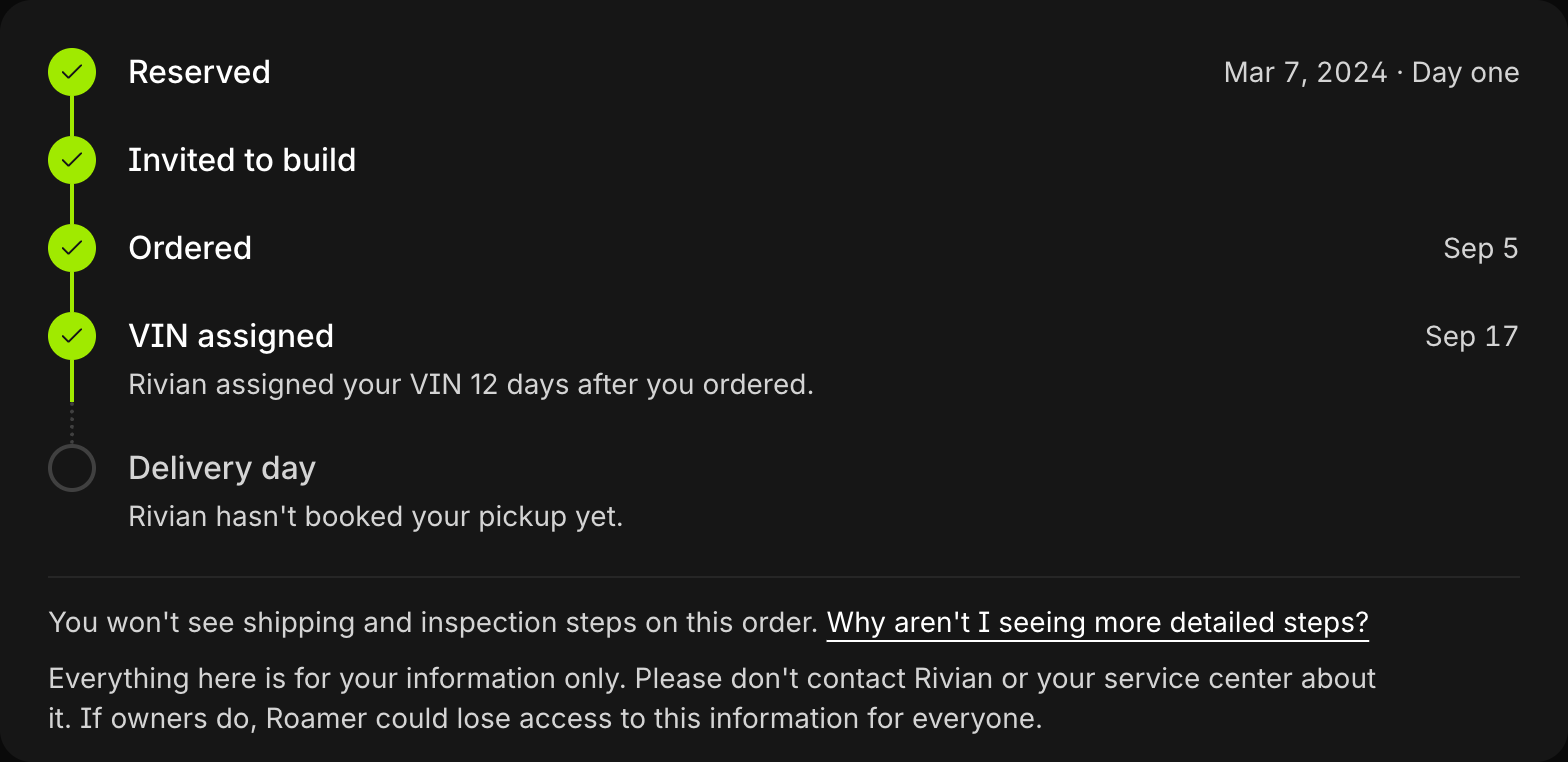
Follow your Rivian order from reservation to delivery day, check public R2 wait times and shop new and pre-owned inventory.
-
Order tracking
FreeWeb · iPhone · Email · Mobile notificationsFollow your Rivian from reservation to pickup day without refreshing Rivian's site.
- Order milestones
- R2 reservations (with a Day-one badge), invites to build, orders, the last five digits of your VIN and booked delivery day with a countdown.
- Delivery details
- Multiple orders on one account with build details, service center pickup address and transport carrier.
- R2 peer context
- Compares daily VIN counts and earlier versus later orders for your exact build, with a link to your VIN block.
- Order notifications
- Email and mobile notification when your VIN is assigned, a day-before delivery reminder and a notice once your delivered Rivian appears.
-
R2 order tracker
No accountWebGet a realistic read on R2 wait times and deliveries across orders on Roamer.
- Shareable build filters
- Filter by paint, wheels, interior, trim and order week, plus a one-click preset matching your own order.
- Wait times and stages
- Current stage breakdown and usual waits from order to VIN and delivery, counting owners still waiting.
- VIN hundred-block map
- Highest VIN, daily VIN pulse and expandable hundred-block views colored by stage or paint.
- Ramps and popular builds
- Delivery ramp, weekly invite-to-delivery charts, monthly invite estimates and most popular builds.
-
Rivians for sale
No accountWebShop new and pre-owned Rivian inventory across the US and Canada with real numbers.
- Deep filtering and Atom feeds
- Filter by model, generation, year, powertrain, battery, paint, interior, wheels, audio, charge port, upgrades and promotions, with custom Atom feeds for any search.
- Live ZIP delivery check
- Checks Rivian live for delivery availability and transfer fees to your ZIP code.
- Loan and lease calculator
- Live quotes with down payment, term, mileage, taxes, buyout and implied lease APR.
- Price check and photos
- Ranks each listing against comparable in-stock builds (adjusting pre-owned for mileage), with six-angle photos, paid options and Carfax links.
Your data, security and platforms
Bring in past history from other apps, export spreadsheets or a free full copy any time and protect your account with passkeys.
-
Import your history
PlusWeb · iPhoneBring over the drives and charges you already tracked in another app.
- ElectraFi, ABRP and TezLab
- ElectraFi ZIPs with GPX routes, elevation, raw readings and saved locations, plus ABRP workbooks and VIN-matched TezLab CSVs.
- Clean cutoff and one-click removal
- Cuts off where Roamer began, keeps imported costs intact, stays off leaderboards and deletes cleanly per service without touching Roamer data.
-
Export filtered CSVs
PlusWeb · AI assistantsDownload a ZIP of drive and charge CSVs matching your current date range, place and tag filters in your chosen units and time zone, complete with weather, elevation, weight, RMS speed, energy breakdown, gas savings, tags and currency.
-
Download a full copy of your data
FreeWebRequest a free ZIP file any time with your account details, vehicles, places, trips, drives, charges, receipts, wheel history, orders and daily raw readings in JSON Lines format with a field reference. Passwords, sign-in tokens and payment details are left out; the copy is yours to keep, though it can't be loaded back into Roamer.
-
Account security and Rivian linking
FreeWeb · iPhoneConnect your Rivian without storing your Rivian password, and protect your account.
- Zero-password Rivian linking
- Stores encrypted access tokens only, supports Rivian two-factor verification and lets you switch which Rivian login syncs your account on the web without losing shared vehicle history.
- Passkeys, two-factor and sessions
- Passwordless passkeys, authenticator app codes with recovery, active session manager for signing out devices or connected apps, per-vehicle remove and restore, and self-serve account deletion.
-
Web, iPhone app and preferences
FreeWeb · iPhoneFree native iPhone app in the US and Canada with mobile notifications, plus a responsive web app everywhere else. Sync five independent unit choices, USD or CAD currency and Light, Dark or System theme across devices, and request an iPhone TestFlight beta invite inside Roamer with Plus.
-
Roamer Plus terms and referrals
PlusWeb · iPhoneOne subscription covers every Rivian in your household, with plain refund and data terms.
- Household billing and 14-day refund
- Monthly or annual billing covers every Rivian on your account, switch plans any time, with a 14-day self-serve full refund on your first subscription and a lifetime Roamer Plus ledger.
- History window and referrals
- You can see and export your history for 30 days after Roamer Plus ends, then it is deleted (with a week's notice); referrals take $4.99 off a friend's first payment and earn you credit once their first paid payment clears, with 14 days after subscribing to add who referred you.
Link for free. Add Plus when you want the history.
Free
$0 once you link your Rivian
- Dashboard for every Rivian on your account
- Software update alerts and history
- Your order's VIN and delivery day
- Where your Rivian stands among similar Rivians, in the iPhone app
- Public software, R2, charging and leaderboard trackers
Roamer Plus
$4.99 a month
or $54.99 a year (about one month free)
One price for every Rivian on your account
Cancel within 14 days from your account page for a full refund.
- Everything in Free, plus:
- Every drive and charge, kept
- Battery capacity and phantom drain over time
- Trips, places and electricity rates
- Efficiency, tires and mileage
- ChatGPT and Claude connector
- Imports and exports
Your history starts the day you subscribe. Cancel anytime. Plus is bought on the web and shows up in the iPhone app too.